The records an inspector asks for, already written

Tot Tracker keeps the safety records a childcare service has to stand over in one place: incident and accident reports, medication given, fire drills, visitors, and the daily checklists for each room. Each one is recorded on the spot by the person who was there, signed where it needs signing, and kept where you can find it in seconds.

Built for Irish nurseries, Montessori schools, crèches and after-school services working to the Early Years Services Regulations and Tusla inspections.
Book a Demo
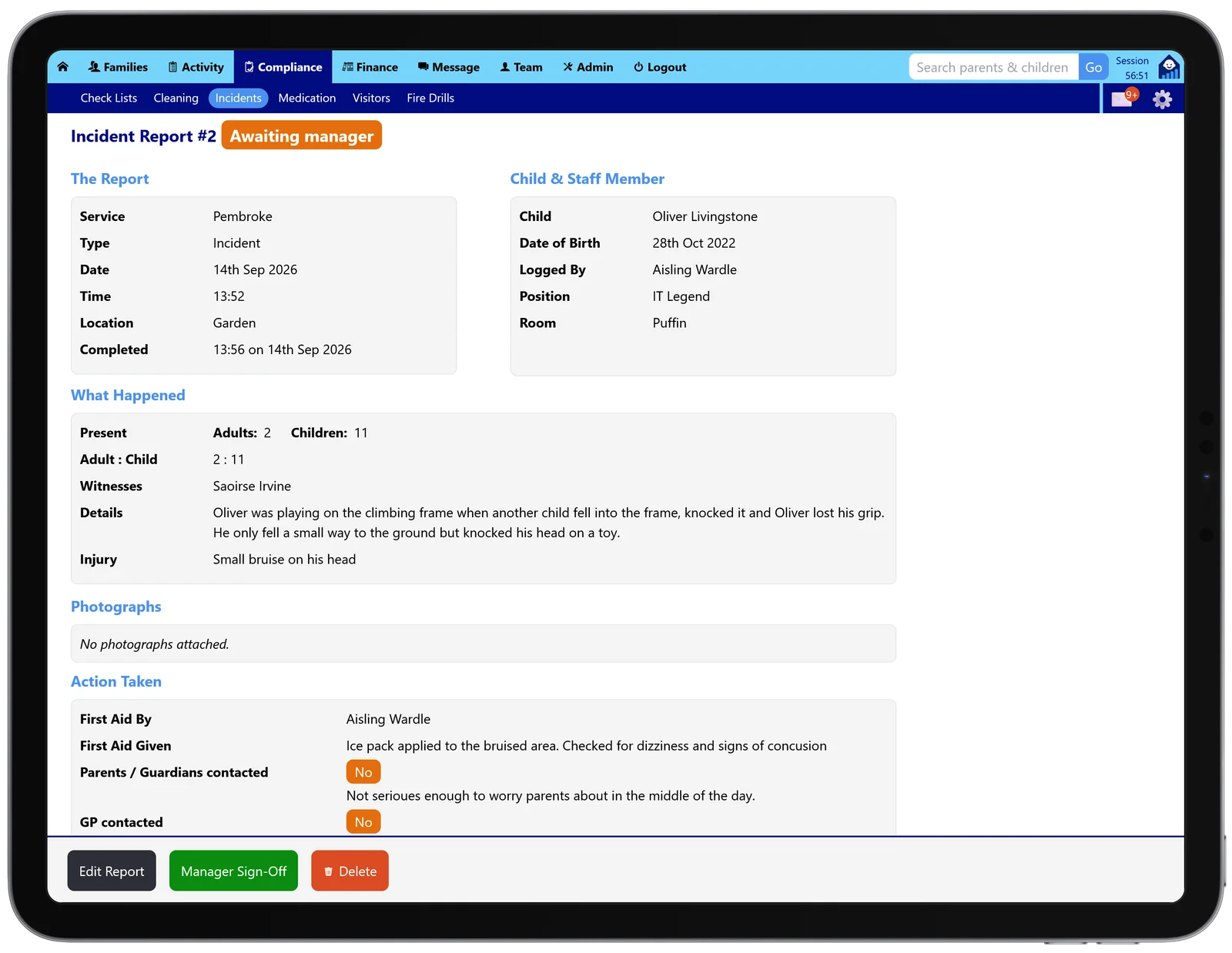
An incident report in Tot Tracker on an iPad, awaiting manager sign-off, with what happened, first aid and who was contacted

Why paper safety records let you down

An accident book on a shelf, a medication sheet on the fridge, a fire drill log in the office and a visitor book at the door. Each one is filled in from memory at the end of a busy day, and the one an inspector asks for is the one with the gap in it.

Tot Tracker records each event where it happens, on the phone or tablet staff already use for attendance. The date, time and the person recording it are captured automatically, so the record is complete before anyone has to remember it.

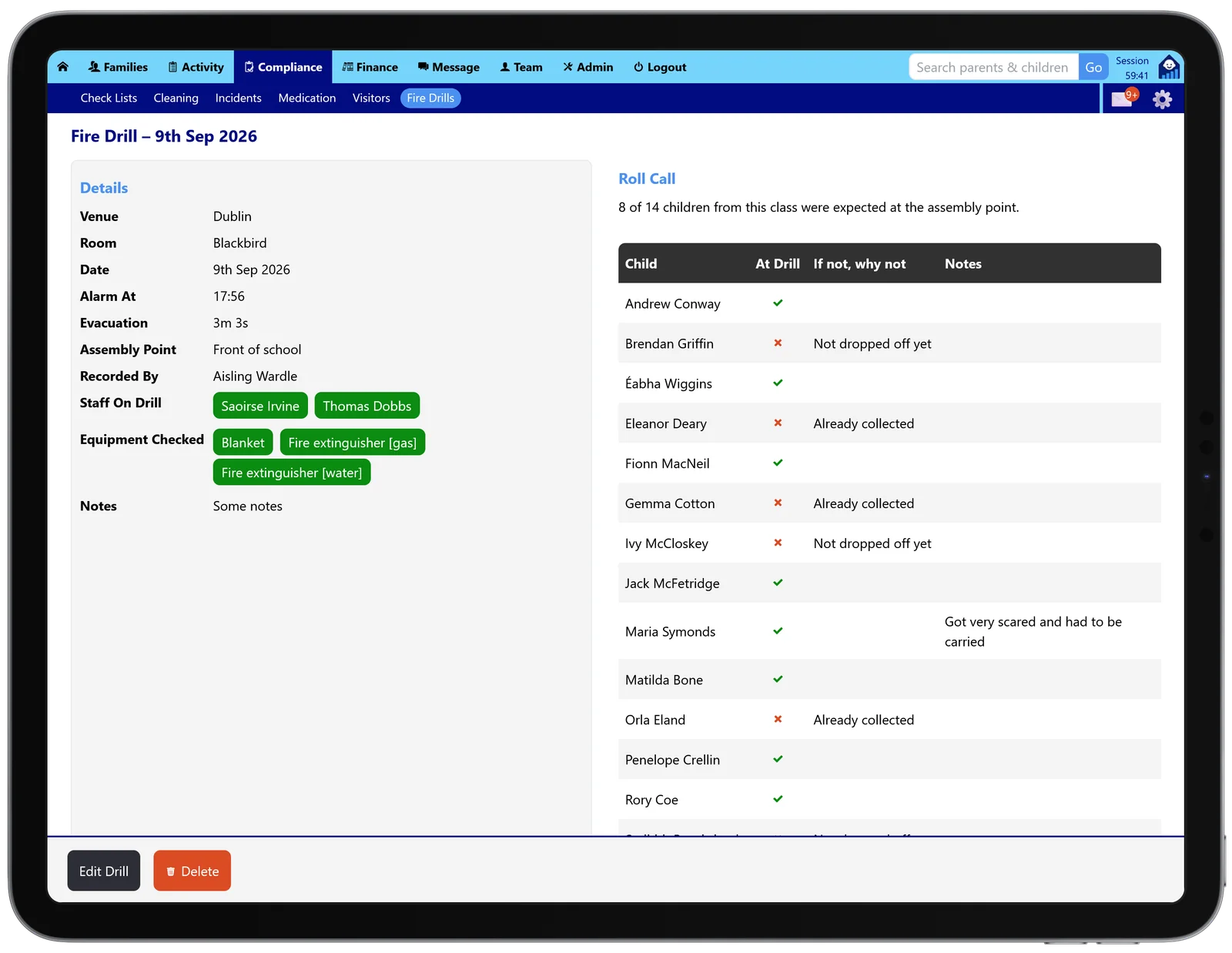
A Tot Tracker fire drill on an iPad with the roll call filled in from attendance at the time of the alarm

Every compliance record in one section

Six records, all working from the children, rooms and staff already in Tot Tracker:

  1. Incidents and accidentsWritten up straight away, signed by the manager and then the parent.
  2. MedicationParent consent, every dose witnessed and signed, parents sign at collection.
  3. Fire drillsThe roll call comes from attendance at the moment the alarm went.
  4. VisitorsSigned in and out on screen, searchable by date.
  5. ChecklistsDaily room and area checks, with notes and photos.
  6. Síolta evidenceRecords from across the app counted against each standard.

Incident and accident reports, written while it is fresh

The educator who was there records what happened, the injury, who witnessed it, and how many adults and children were present, with the adult to child ratio worked out for you. Up to ten photographs can go with the report.

Prompts cover the things that are easily forgotten later: who gave first aid and what was given, and whether the parents, GP, emergency services or your insurer were contacted. You also record whether it is a notifiable incident. A risk assessment closes the report: what you did straight away, and what will stop it happening again.

A Tot Tracker incident report showing what happened, the adult to child ratio, first aid and who was contacted

Manager sign-off, then the parent signs at the door

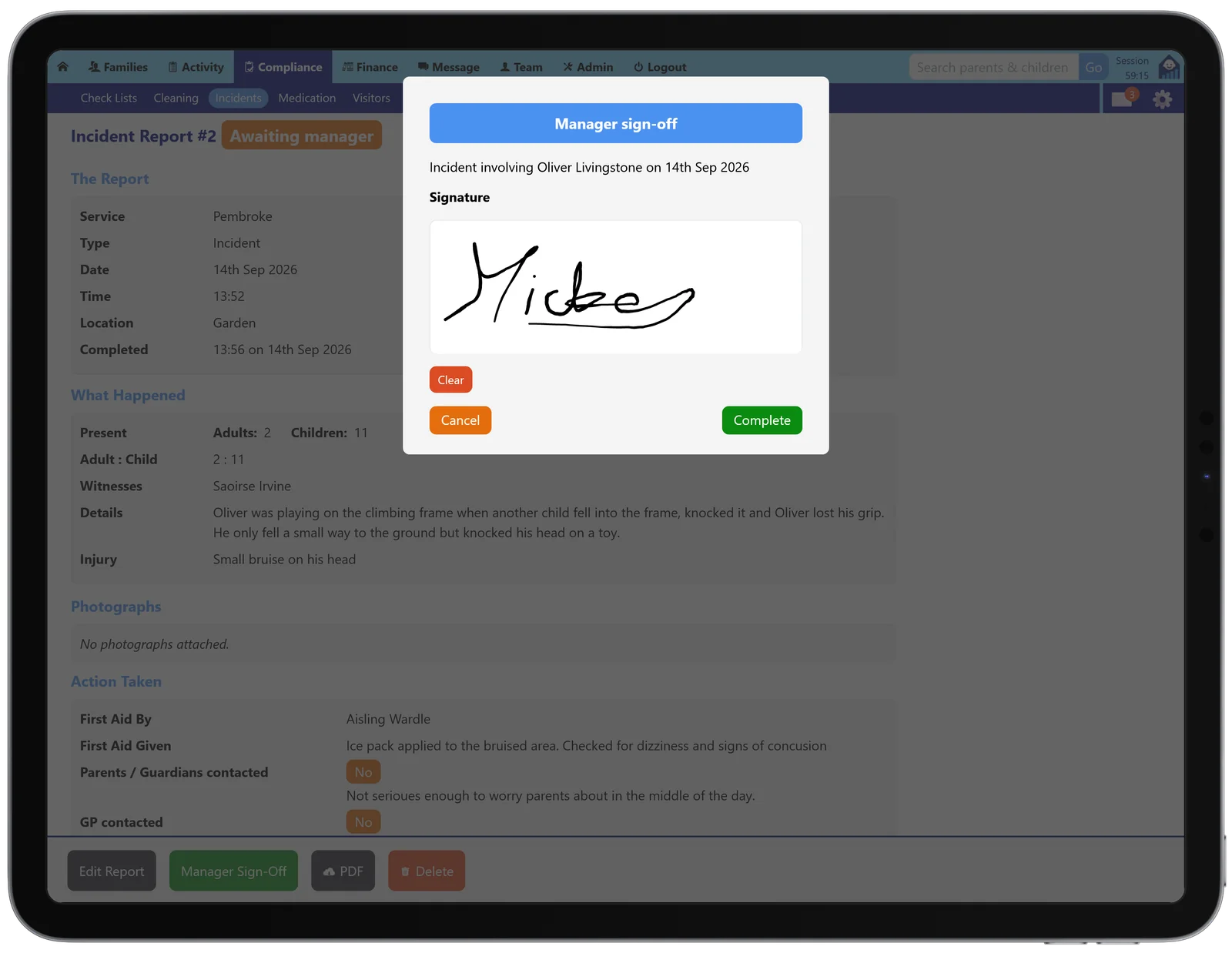
A report waits as "Awaiting manager" until someone senior has read it and signed on screen, so it is obvious what is still outstanding. Then it moves to the parent.

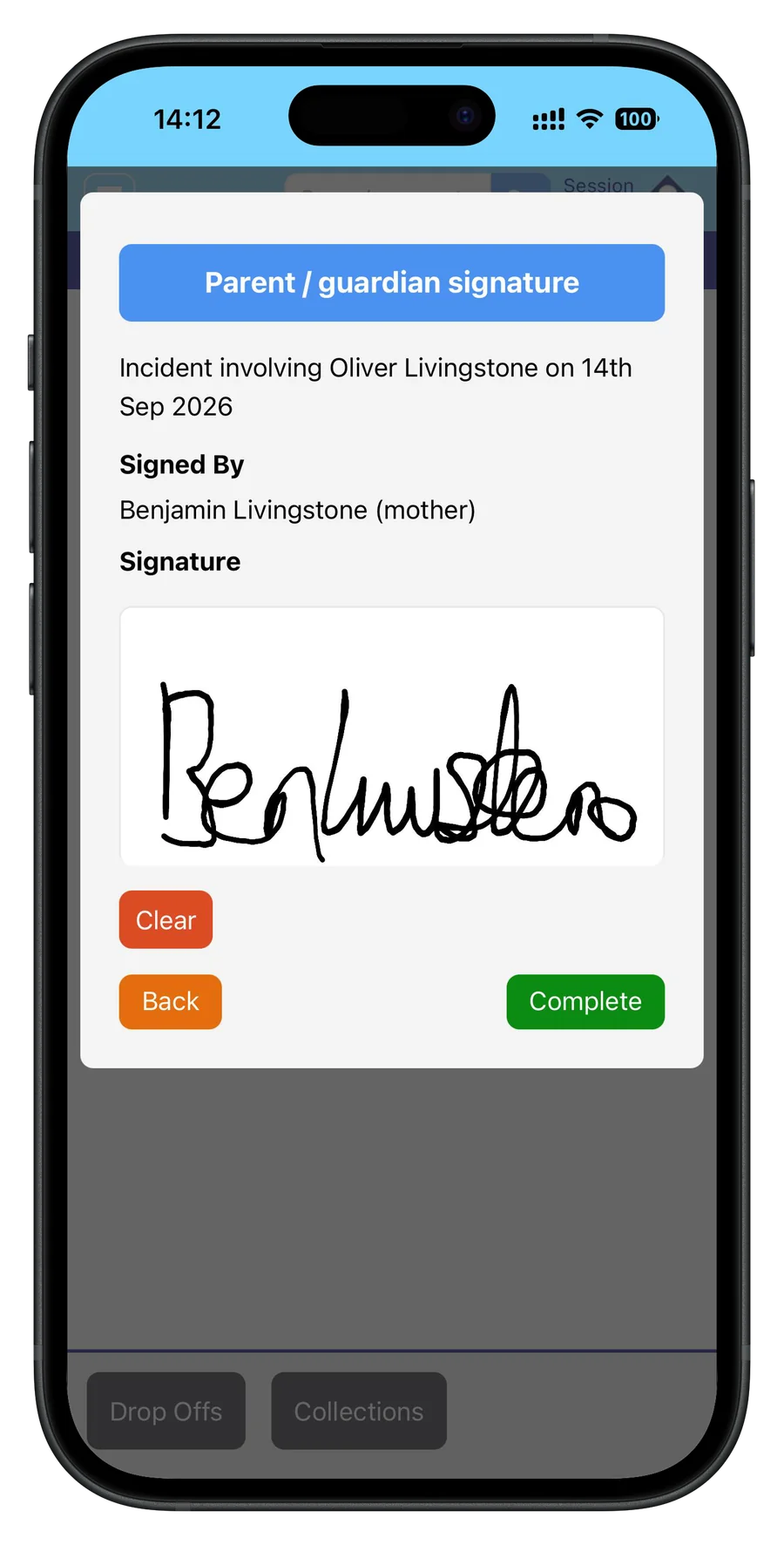
At collection, the attendance screen puts any unsigned report in front of the parent to read and sign on the device. If they skip it, or someone else collects, the manager is told. You can also email the report with a link, and the parent signs by typing their name, uploading a signature or drawing it. Until a parent signs, the child’s record shows the report as unsigned.

A manager signing off an incident report on screen in Tot Tracker
A parent signing an incident report on a phone at collection

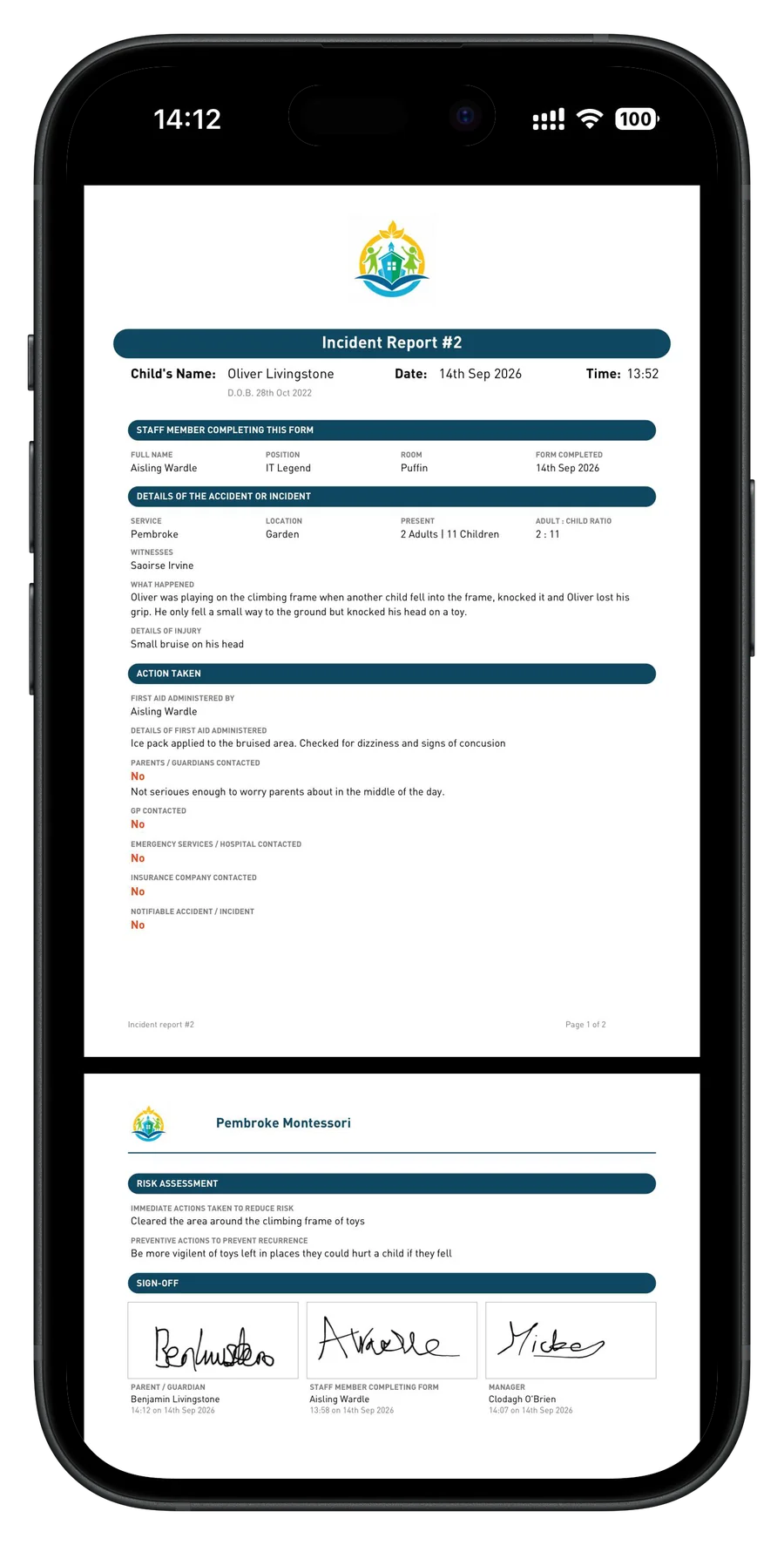
One PDF with all three signatures

With the last signature in, the report is a PDF carrying the staff member’s, the manager’s and the parent’s signatures, each with the time it was given, under your own logo. That is the copy you print, email, or hand across at an inspection.

The incident list filters by venue, room, type, status, date and child, so you can answer "show me every accident in the Toddler room this term" in seconds.

A signed Tot Tracker incident report PDF with staff, manager and parent signatures

Medication: consent first, every dose witnessed

Planned medication starts with a consent form the parent signs before anything is given. One-off doses, such as Calpol for a temperature, are given under the general consent on the child’s file and closed off at the end of the day.

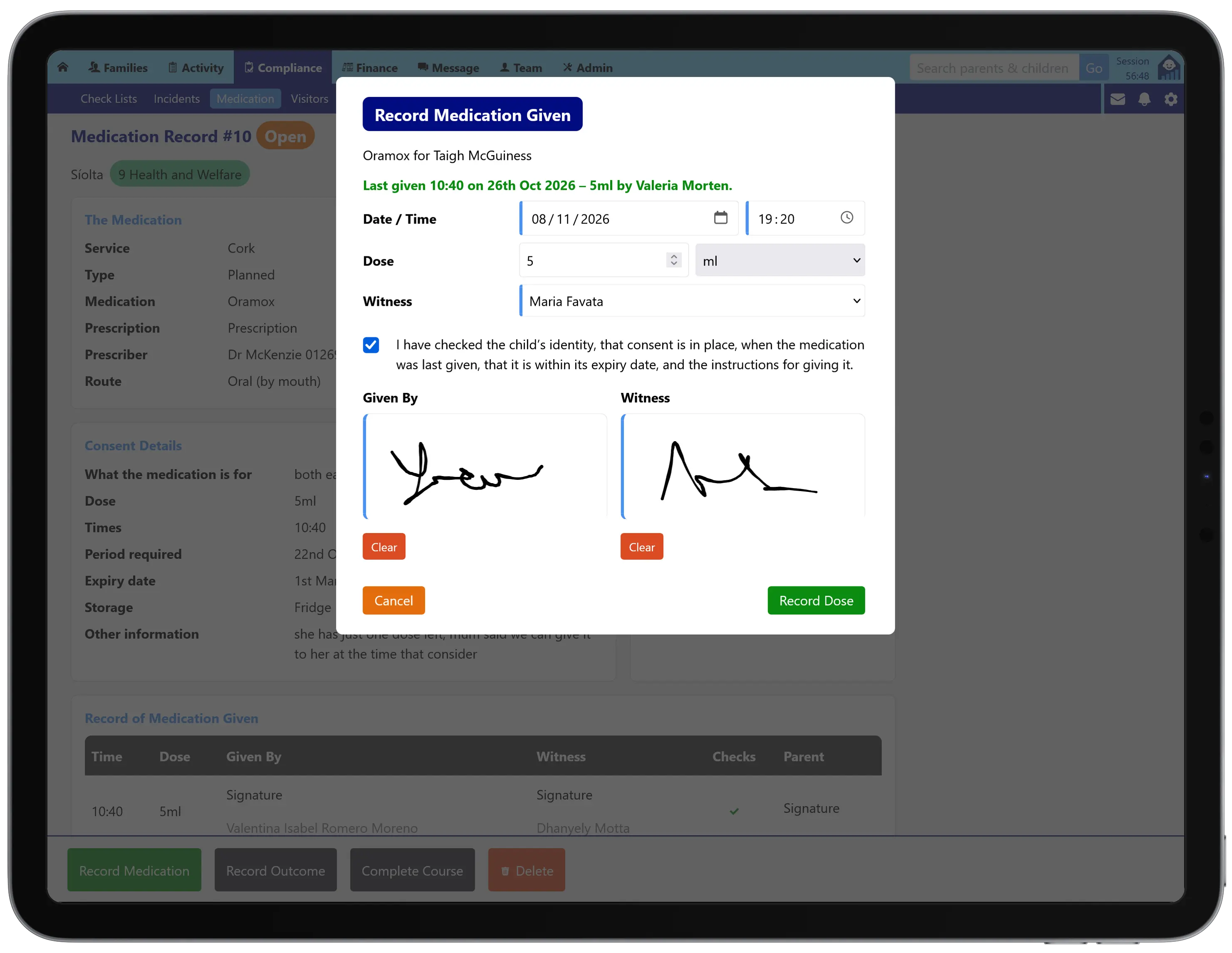
Each dose records the time, the amount and the route, with a second member of staff as witness and both signing on screen. Staff must confirm the label matches the child before the record will save, and if the child’s file shows an allergy to the medicine they must confirm they checked with a parent. Parents sign for the day’s doses at collection or from an emailed link.

Recording a dose of medication in Tot Tracker on an iPad, with the last dose given, the witness, the safety checks confirmed and both staff signatures

Fire drills with a roll call that fills itself in

Record the drill where you are standing: the time the alarm went, how long the evacuation took, the assembly point, the staff on the drill and the equipment checked on the way out. The assembly point and your equipment list carry over from the last drill, so the next one starts half done.

The roll call is built from attendance at the time of the alarm. It shows how many children were expected at the assembly point, and every child not there is accounted for as not dropped off yet, already collected or at an appointment. Notes go beside any name.

A Tot Tracker fire drill roll call showing each child at the drill, already collected or not yet dropped off

A visitor book that cannot go missing

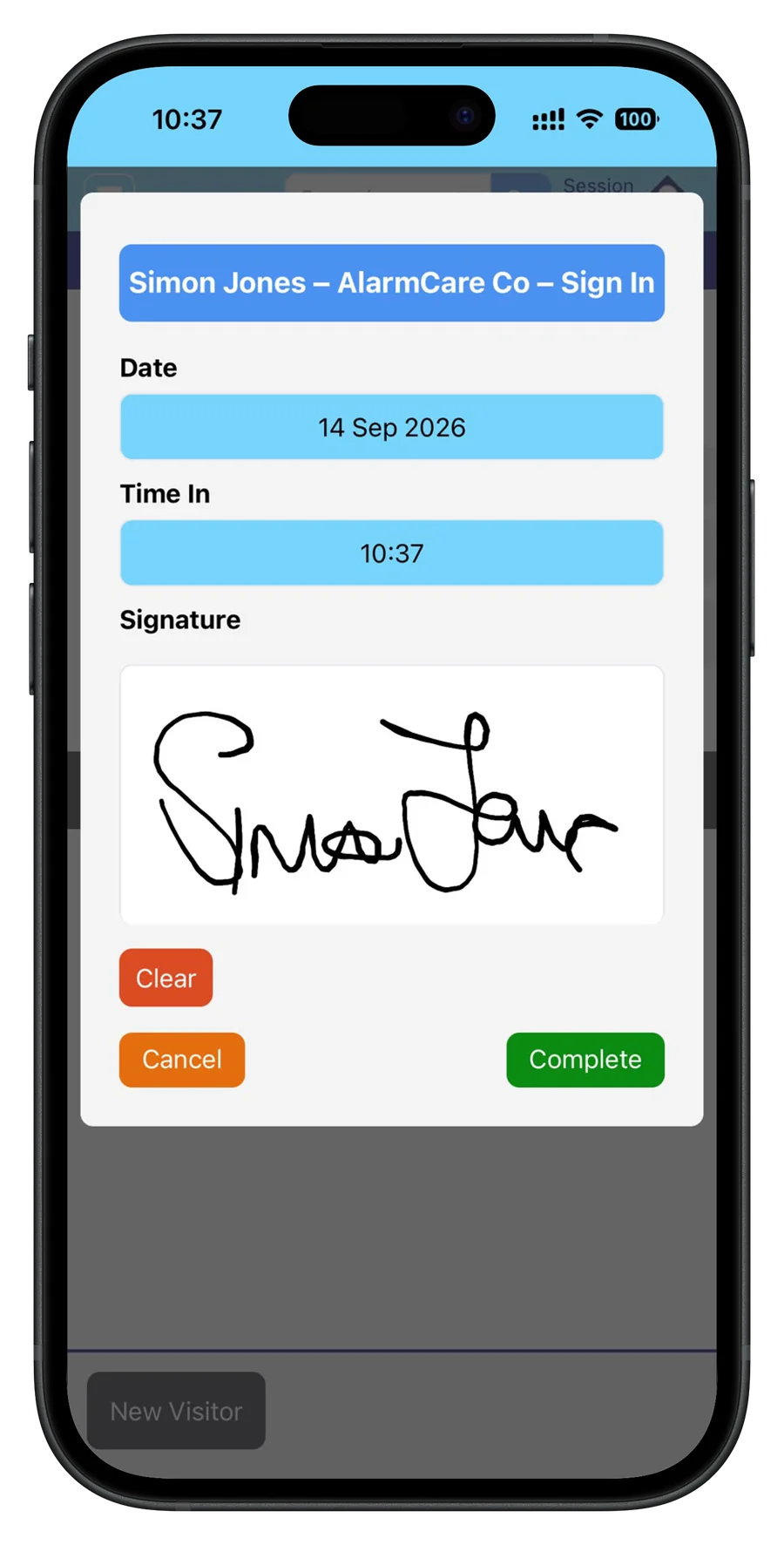
Visitors can be booked in ahead, then sign in at the door on screen with their name, who they are from and the time they arrived, and sign out on the way back through. You can see at a glance who is not yet arrived, on site or signed out.

Every entry stays searchable by venue and date, so “who was on site on Tuesday afternoon?” takes seconds rather than a search through a folder.

A visitor signing in on a phone in Tot Tracker with the date, time in and their signature

Daily checklists for every room and area

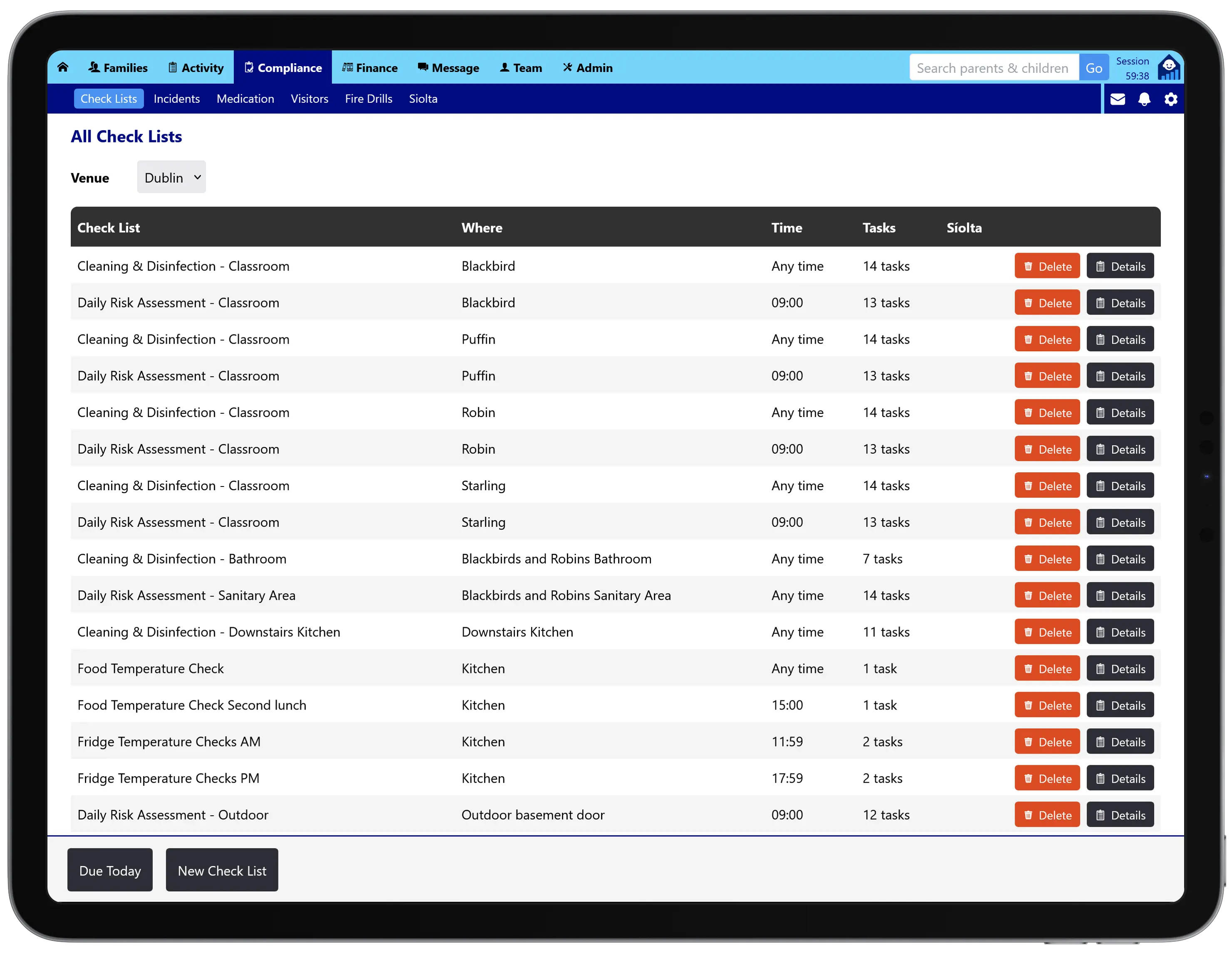
Set up the checks each room or area needs, such as cleaning and disinfection, a daily risk assessment or fridge and food temperature checks. Each list belongs to a room or area, has a time it should be done by or can be done any time, and each task can be set for the weekdays it applies to. A list can be duplicated to the next room in one step, so every room and area of a venue is covered in minutes.

Each morning staff see what is due today. They mark each task done or not done, add a note or up to three photos, and add any general observations. Every completed run is kept exactly as it read on the day, with a score such as 6 of 7, so you can show what was checked and when.

A venue’s checklists in Tot Tracker on an iPad, such as cleaning and disinfection, daily risk assessments and fridge temperature checks, with the room or area, the time and the number of tasks for each

Síolta evidence, gathered as you go

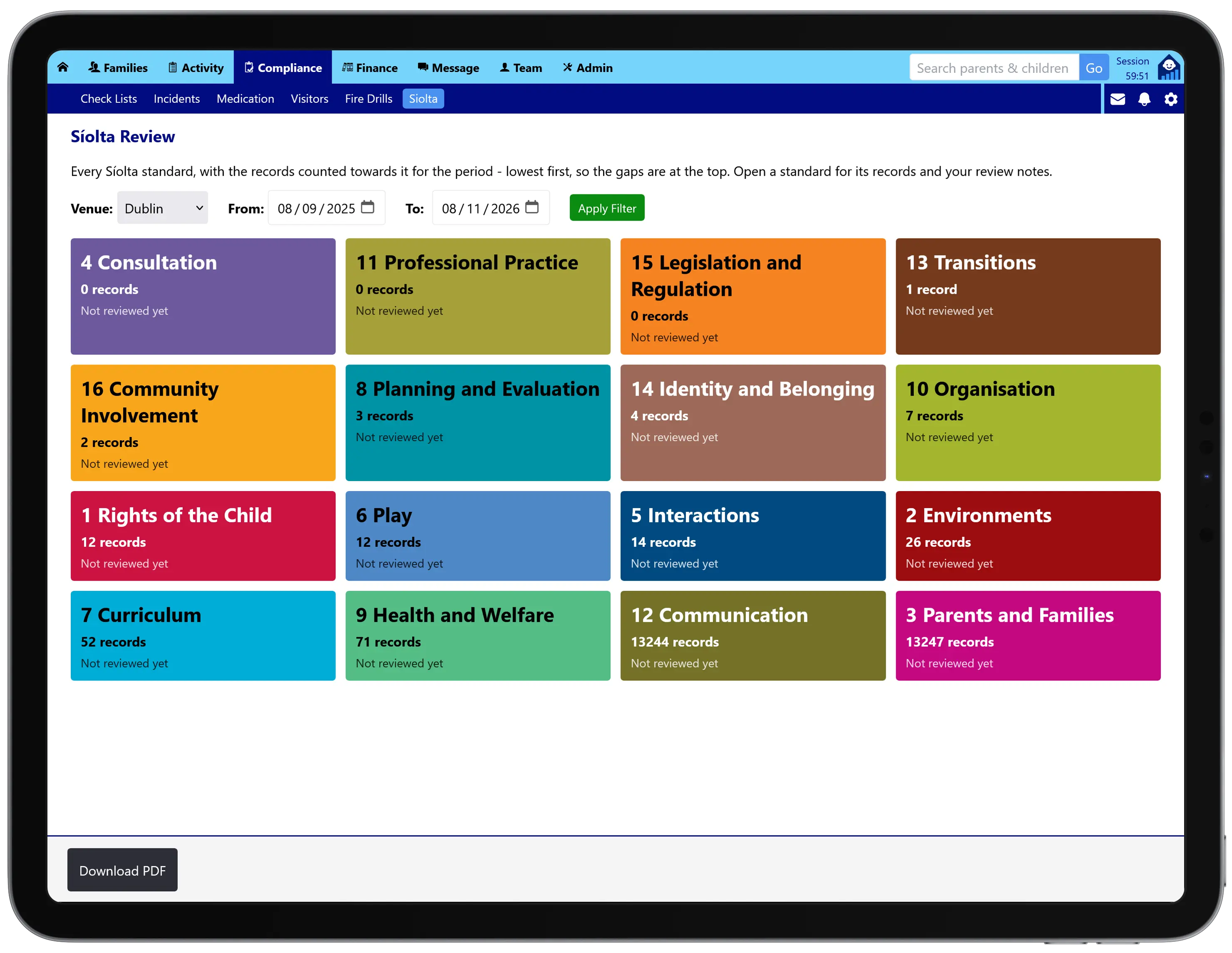
The records you keep for compliance count as evidence for Síolta. Checklists, fire drills, incidents, medication and visitors are counted automatically, along with your lesson plans, observations, parent messages, menus and care plans.

The Síolta review shows a tile for every standard with how much evidence you have for the period, lowest first, so the gaps are at the top. Record what you do now, what you will improve and when you will review it again, then download it as a PDF.

The Tot Tracker Síolta review on an iPad, with a tile for each of the 16 standards showing how many records count towards it, lowest first

Written around the Irish regulations

The guidance inside each form is written for Ireland. The incident form refers to the Early Years Services Regulations 2016 and reminds you that some incidents must be notified to Tusla in writing within three working days. The medication form reflects the requirement for written parent consent.

Tot Tracker records whether an incident is notifiable and gives you the signed report to send, but it does not file the notification with Tusla for you.

Medication given under a child’s allergy or medical care plan and the attendance behind every fire drill roll call are the same records you use every day, so nothing is entered twice.

Compliance and safety records are included in every Tot Tracker plan at one per-child price. See Tot Tracker pricing or explore all features.

Common questions

No, and Tusla does not approve software. Tot Tracker keeps the records the Early Years Services Regulations expect a service to hold, such as incident and accident records, medication records and fire drill records, in a form you can show an inspector.
Parents can sign on the staff device at collection, or from a link in an email, by typing their name, uploading a signature or drawing it. Until they sign, the report stays flagged on the child’s record.
No. The incident form records whether an incident is notifiable and the guidance explains the three working day notification, but the notification itself is sent by you.
No. Every dose is recorded with a witness and both staff sign on screen, so a dose cannot be recorded unless a second member of staff at the venue is available to witness it.
No. Visitors sign in on any phone or tablet your staff already use with Tot Tracker.
Checklists are set up by weekday, so a task can run every weekday or only on chosen days. Weekly and monthly schedules are not available yet.

Related features

From the Knowledge Centre

Inspection ready, without the folders

Book a free demo and we’ll walk you through incident reports, medication, fire drills, visitors and checklists, and show you how parents sign at collection.