Why childcare billing is complicated
An Irish childcare fee is rarely one fixed monthly number. What a parent owes depends on a set of inputs that change from child to child and, often, during the year:
- Different enrolment types, each with its own weekly fee
- The weeks your service is actually open, which differ between Montessori, crèche and after-school
- ECCE capitation for eligible children
- NCS subsidised hours, which can change mid-year
- Discounts
- How many months the parent spreads payment over
- Mid-year changes to days, hours or subsidy
- Holiday camps and other one-off charges
Tot Tracker takes those inputs and calculates the parent-facing amount for you. Change one of them and the amount is recalculated, based on what has already been paid and what is still to come.
The billing workflow, start to finish
- Enrolment and fee setupWeekly fee, ECCE eligibility and payment months per enrolment type.
- Year configurationOpen weeks, ECCE periods, bank holidays and feeder-school term dates.
- Child detailsCHICK code, NCS hours, ECCE eligibility and discounts per child.
- Fee schedulesA clear annual schedule and monthly amount for every child.
- ECCE and NCS deductionsSubsidies taken off before the parent amount is set.
- Invoice generationMonthly invoices built from the schedules, plus one-off charges.
- Payment collectionDirect Debit, bank transfer or card.
- ReconciliationPayments matched to the right invoice and family.
- Overdue balancesAn aged view of who owes what, and for how long.
Enrolments and fee setup
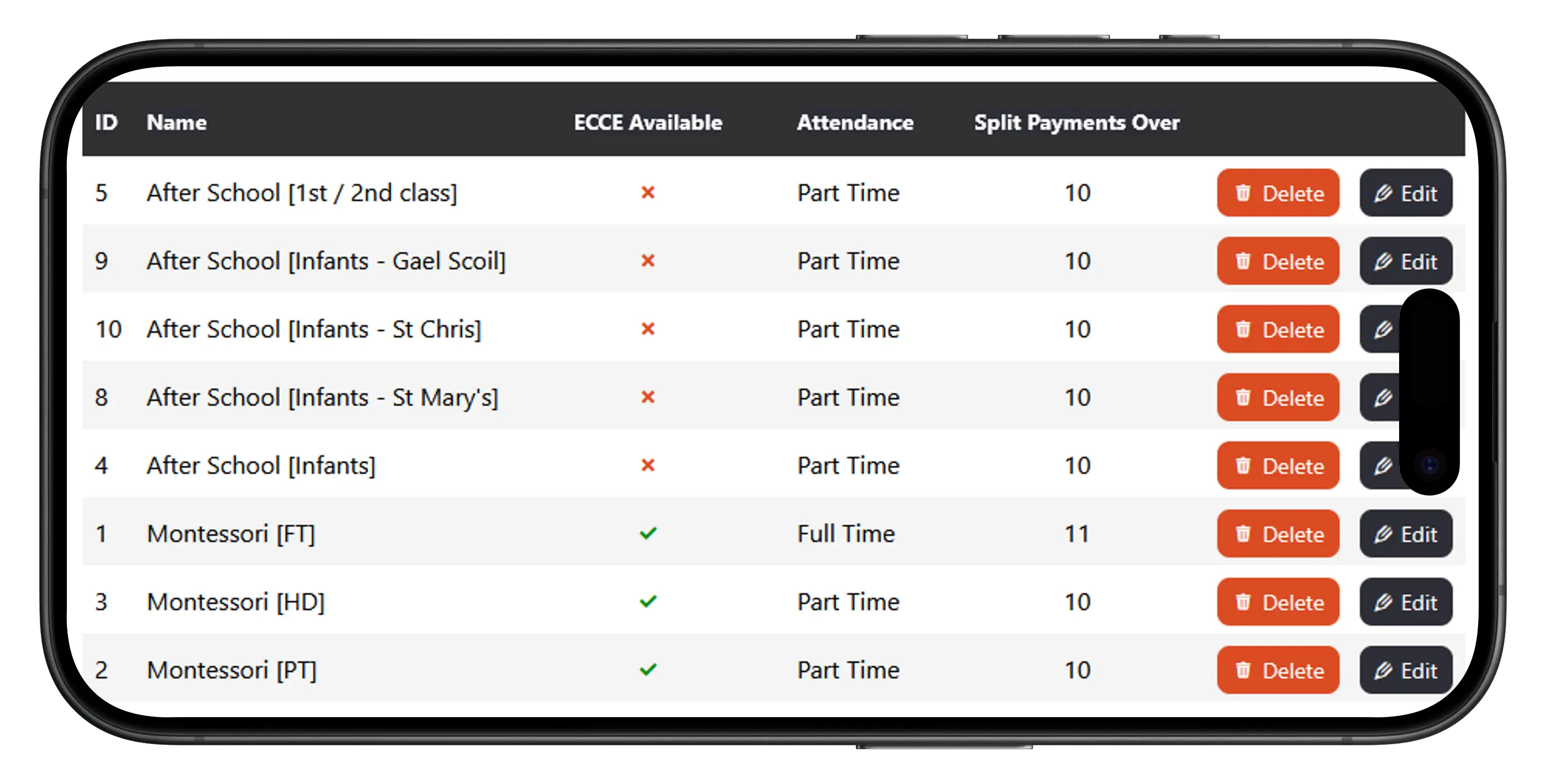
Every child is assigned an enrolment, which describes their time with you. Create as many enrolment types as you need. A Montessori with after-school care might have full-time Montessori, part-time Montessori and an after-school enrolment per age group or feeder school.
The enrolment holds the financial basics: the weekly fee, whether ECCE applies, and how many months payments are spread over. Set it once and every child on that enrolment is billed the same way.
Year configuration
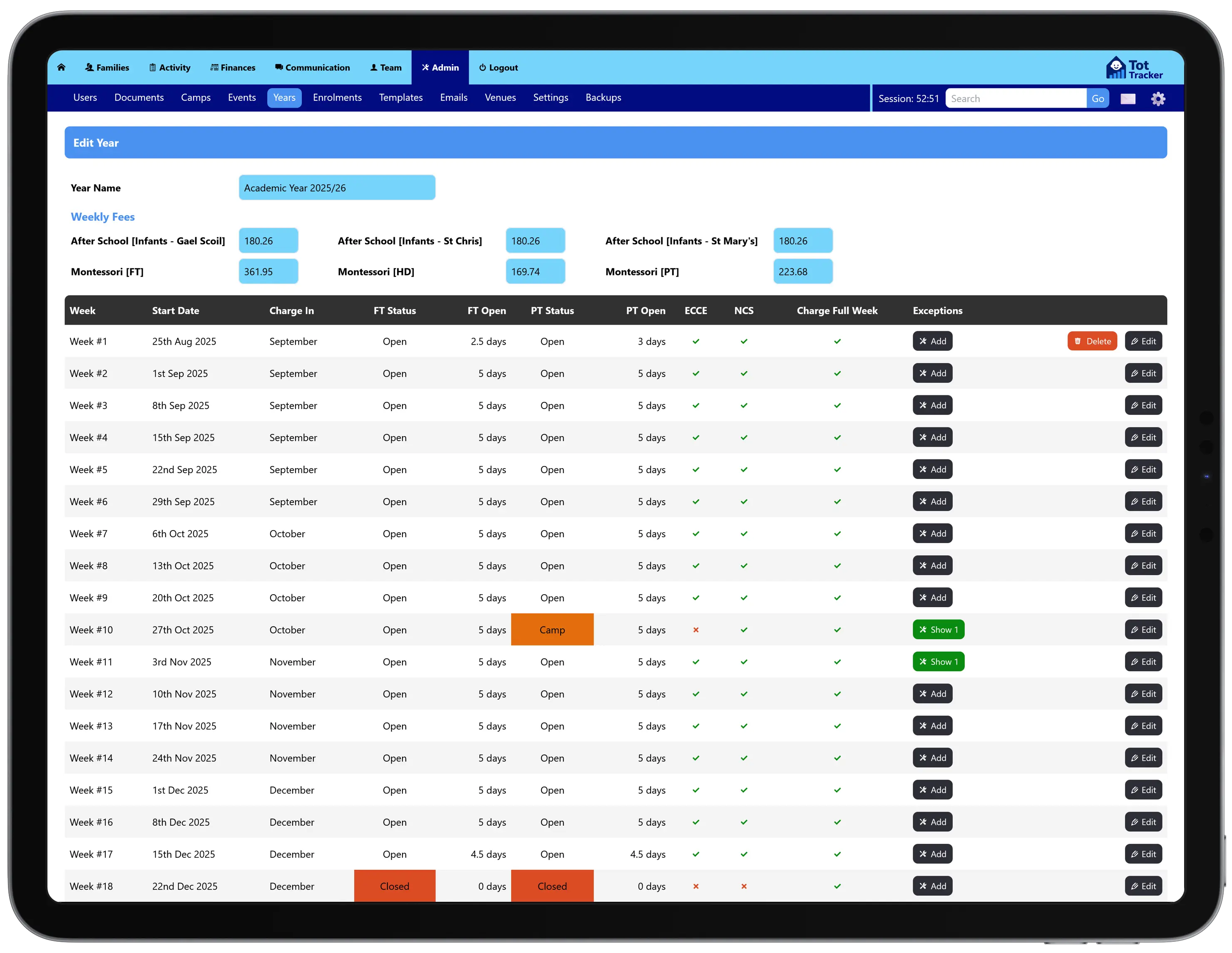
A Year profile tells Tot Tracker the weeks you are open, when ECCE applies, and any dates that need special treatment, such as bank holidays or closures.
If your after-school children come from schools with different term dates, set them here. Every calculation downstream is based on the calendar your service actually follows, not a generic 52 weeks.
Child details
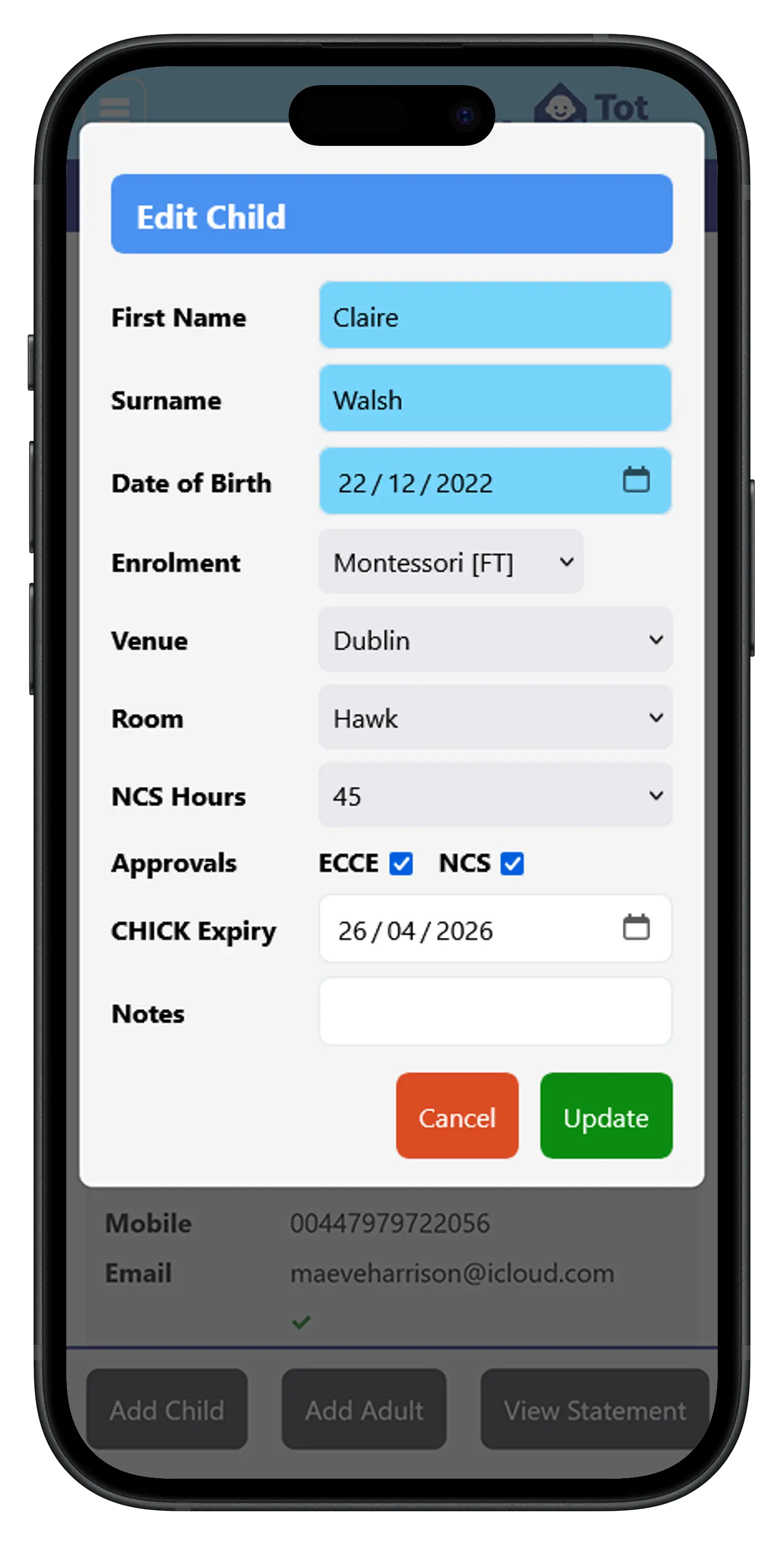
Import hundreds of children in one go when you start, then add new children as they join. Each child holds what billing needs: enrolment, CHICK code, NCS hours, ECCE eligibility and discounts.
New families can arrive with their details already captured through digital enrolment forms, and you are alerted when a CHICK code is close to expiry so NCS funding does not lapse.
Fee schedules with ECCE and NCS deductions
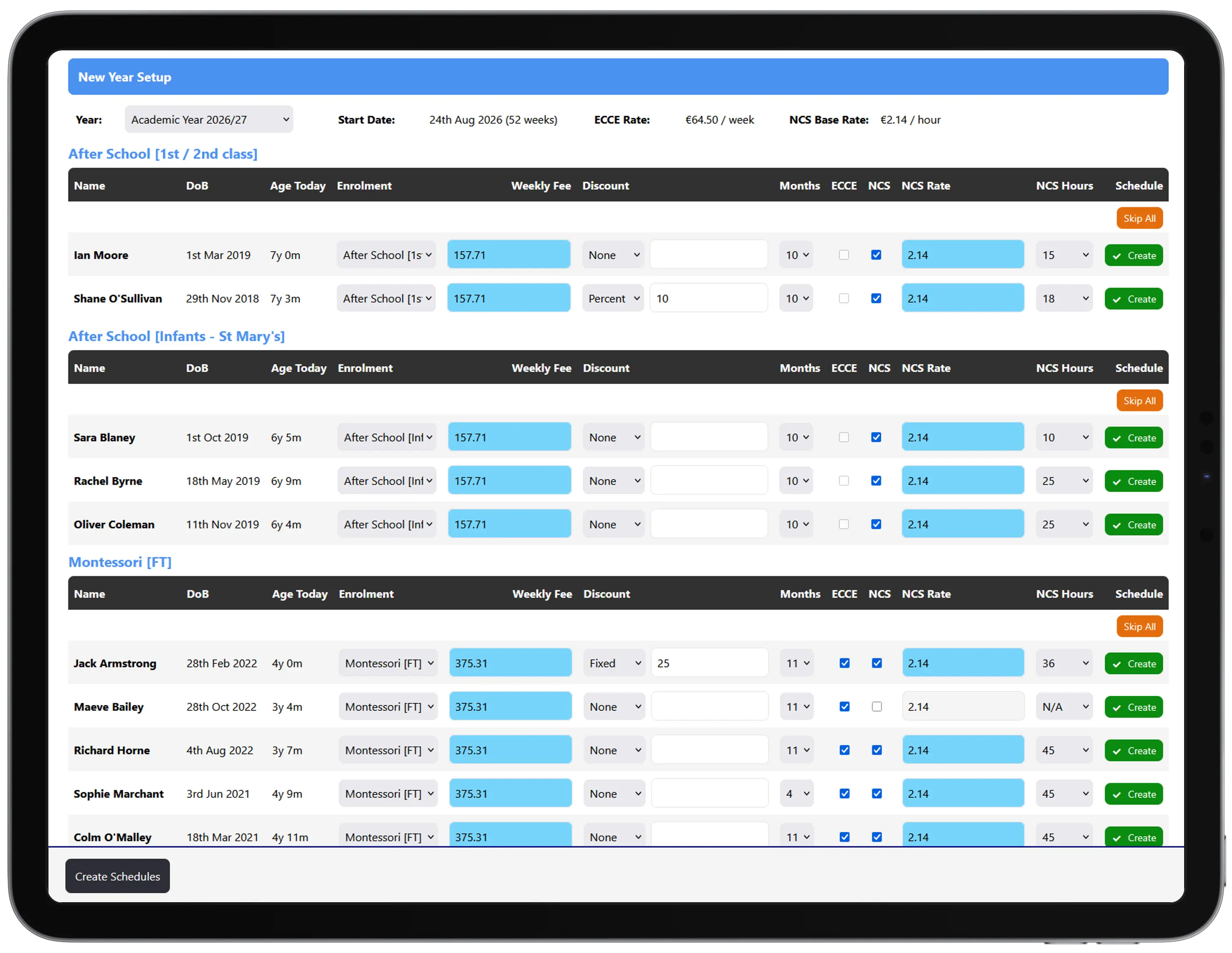
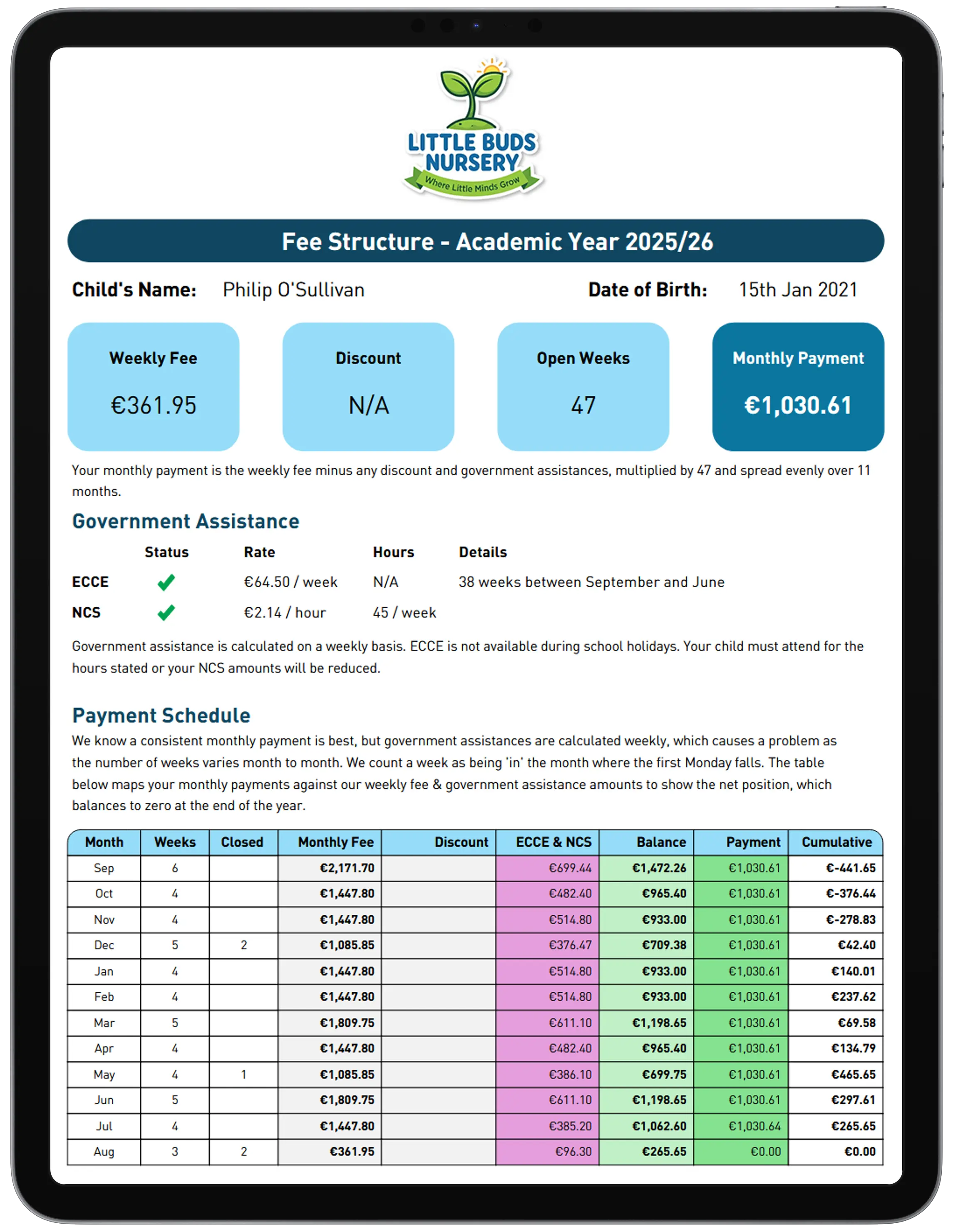
Tot Tracker builds a parent-friendly fee schedule for every child. It shows the headline rates and, most importantly, the monthly amount the parent pays.
- The weekly fee comes from the enrolment type
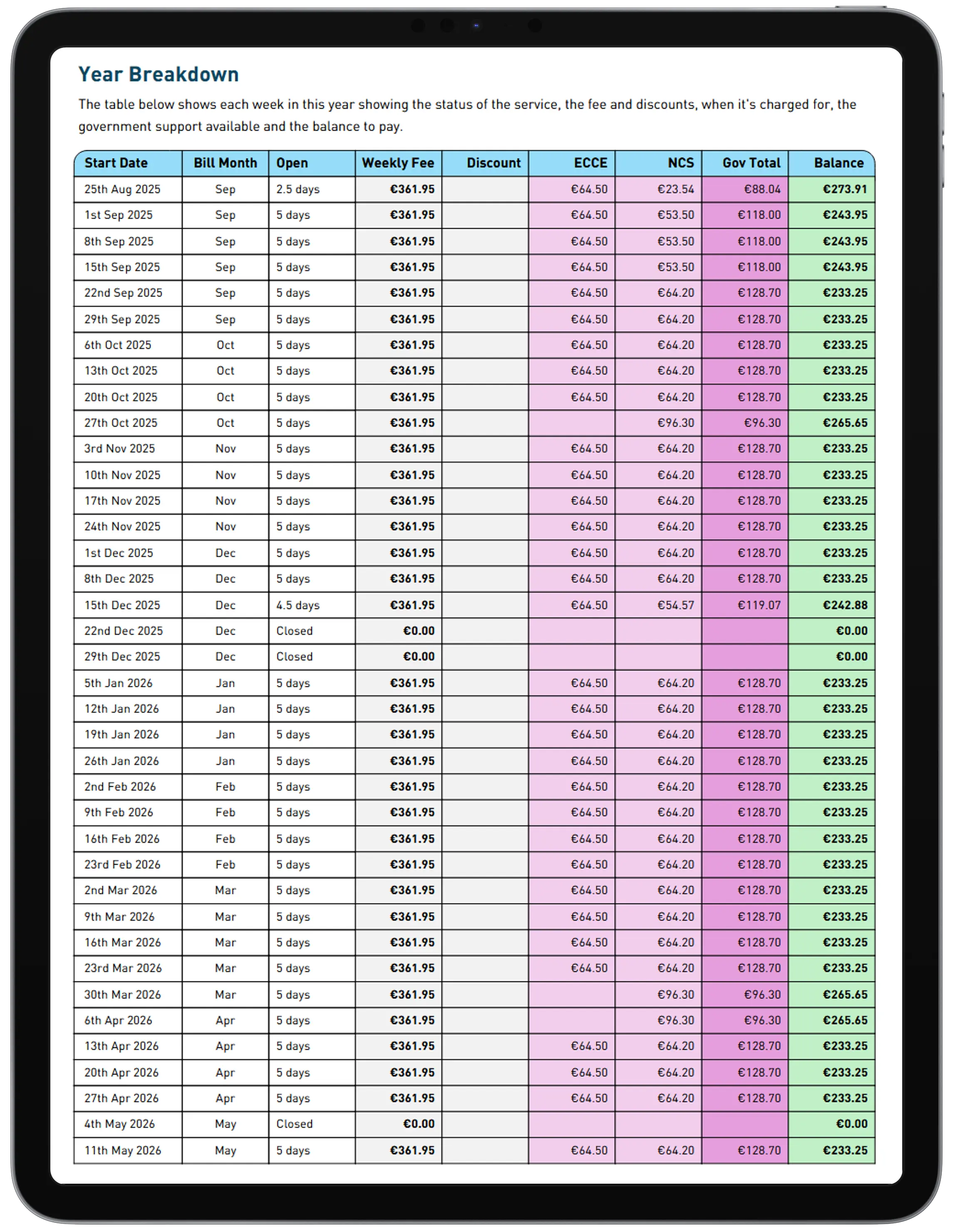
- The Year profile defines the weeks you are open
- Together they give the starting annual amount
- Discounts are applied
- ECCE (weekly) and NCS (hourly) subsidies are deducted
- The balance is spread equally across the payment months
- Mid-year changes trigger an automatic recalculation
When a child leaves part way through the year, the schedule shows whether the family has over or under paid to date. No more working it out on a calculator at the front desk.
How NCS, ECCE and your invoices connect
ECCE and NCS reduce what a family pays, but they work differently. ECCE capitation is a weekly amount during the ECCE programme weeks. The NCS subsidy is an hourly rate applied to the child's registered NCS hours, usually for time outside the ECCE session.
Tot Tracker deducts both on the child's fee schedule, so the invoice shows the parent what they owe after funding. When NCS hours change, the monthly amount is recalculated from that point on. Attendance is recorded against the same child, which is what NCS and ECCE compliance tracking and the inspection report are built on.
The same schedule appears in the NCS inspection view, so you can show an inspector that the full subsidy has been passed on to the parent.
Invoice generation
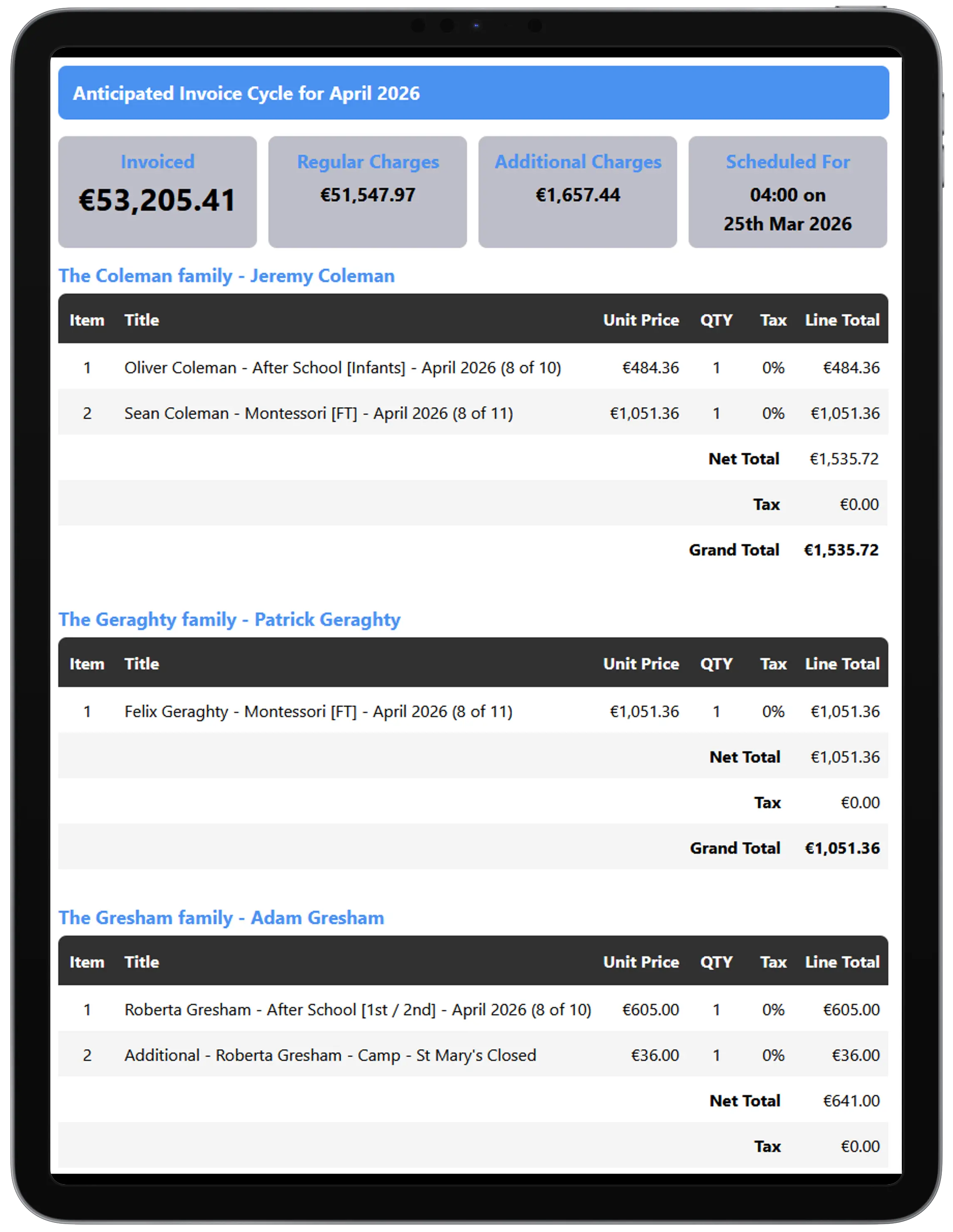
On the 28th of each month, or earlier if you prefer, Tot Tracker creates invoices for every family from their children's schedules. Adjustments and one-off charges are added automatically, typically holiday camps, deposits or NCS hour changes.
Preview exactly what will be invoiced at any point in the month. Once created, invoices appear in the parent app straight away and can be emailed to parents with one click.
Payment collection and reconciliation
Direct Debit is the easiest way for parents to pay. They set up their mandate in the parent app, they never have to remember an amount, and you know how much is arriving and when. Set your collection date, typically around the 2nd of the month, and Tot Tracker collects, allocates each payment to the right invoice, and tells the parent they are paid up.
Direct Debit and account-to-account bank transfers are included at 0%. Parents can also pay by card, at 0.75% for personal debit and credit cards issued in the EEA and UK. Other cards cost more.
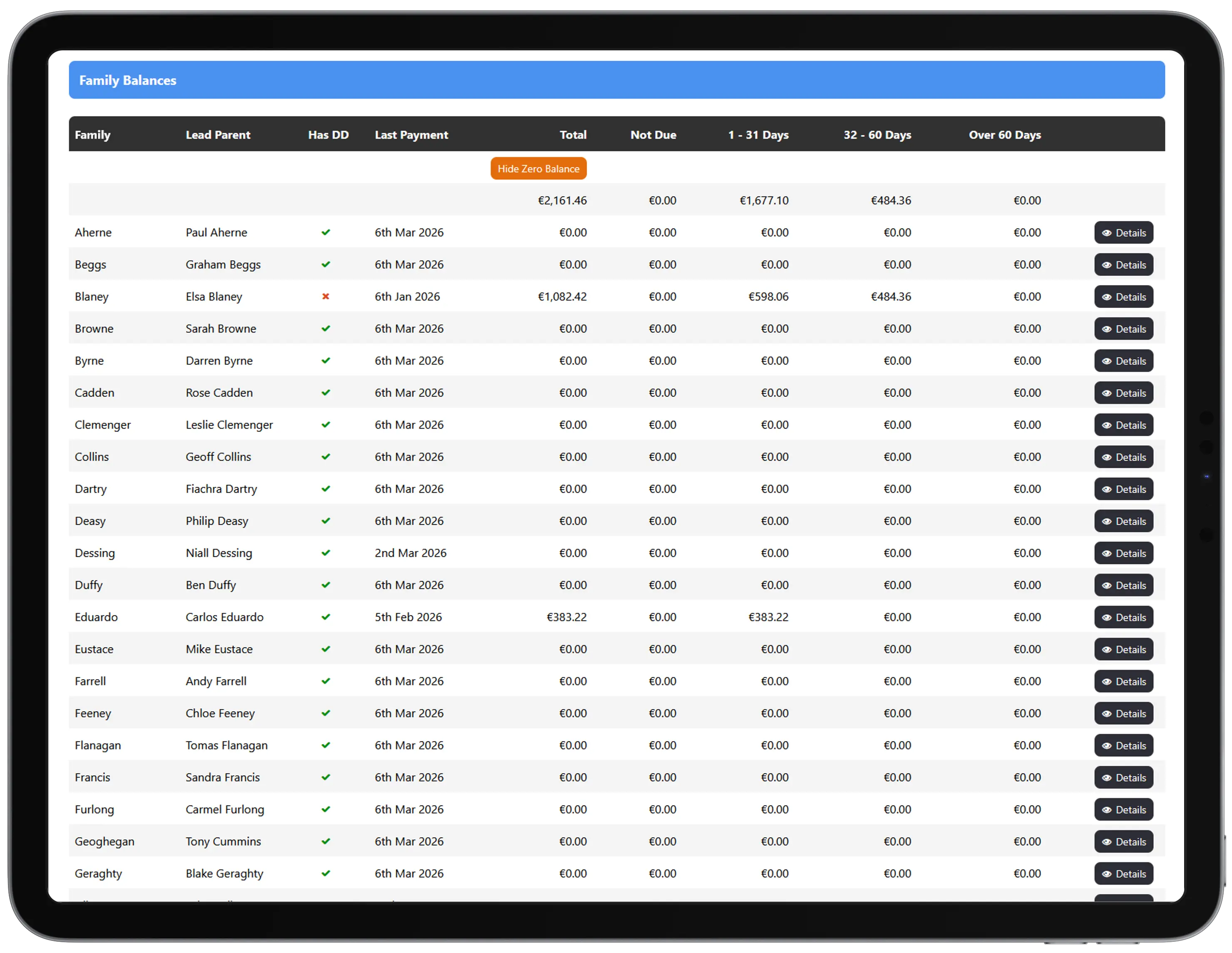
Anything not paid on time shows up in the aged debtor view, so overdue balances are visible without anyone reconciling a spreadsheet.
What your parents see
Billing is part of the same parent app families use for daily updates and messages.
- Every invoice, as soon as it is created
- Statements showing charges, funding and payments
- Receipts for payments made
- Their Direct Debit mandate and other payment options
- Their current balance, so there are fewer "how much do I owe?" messages
For owners and administrators
The point of childcare invoicing software is time back and fewer mistakes:
- No spreadsheet formulas to calculate fees after ECCE and NCS
- Predictable monthly billing on a date you choose
- Payments matched to invoices, so reconciliation is quick
- Overdue balances visible at a glance
- No manual recalculation when hours, days or subsidies change
Manual childcare billing vs Tot Tracker
Manual
Working out each family's fee after ECCE capitation and NCS subsidy in a spreadsheet
With Tot Tracker
Fee schedules calculate the parent amount from the enrolment, calendar and funding
Manual
A change in NCS hours means recalculating the rest of the year by hand
With Tot Tracker
The monthly amount is recalculated automatically from what has been paid
Manual
Camp fees and deposits tracked separately and added to invoices manually
With Tot Tracker
One-off charges are added to the next invoice automatically
Manual
Chasing parents who forgot to pay or paid the wrong amount
With Tot Tracker
Direct Debit collects the exact amount on a set date, at 0% fees
Manual
Matching bank statement lines to families at month end
With Tot Tracker
Payments are allocated to the right invoice, with an aged debtor view for anything outstanding